This feature is currently available on: Bolt, Dart2, G62, G100, G120
Ensure you are on the latest version of firmware to use this feature. Check the device release notes for more information.
These devices have the capability to accumulate run hours and odometer readings. In order to use this feature, it must first be enabled on OEM. The following settings are available:
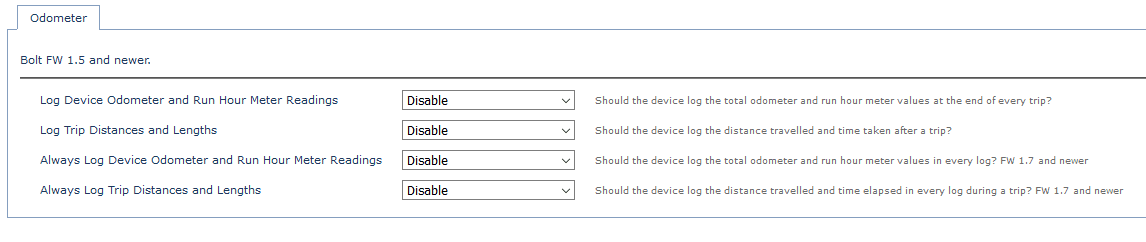
Log Odometer and Run Hours: If this setting is enabled, the device will include the current odometer and run hour estimates in the end of trip device log.
Log Trip Distances and Lengths: If this setting is enabled, the device will include the distance travelled and time elapsed during the trip in the end of the trip device log.
Always Log Distances and Lengths: Yes/No
If these settings are enabled, the device will include these readings in its payload with every data point during a trip.
How are these Readings Calculated?
The odometer values are not read from the vehicle, instead they must initially be set by either an async message or an SMS. The device then uses second by second GPS positions and speeds to estimate the distance travelled and increment the odometer reading, allowing for an approximation of the vehicle’s on-board odometer.
If movement trips are used as an ignition source then all detected movement is added to the odometer. To prevent the odometer from incrementing during transport (e.g. Towing), the movement digital input mapping can be changed from ignition. An alternative method for starting an ignition based trip should be enabled in this case, such as run detect or wired ignition based trips.
The device run hours value can be set using either an async message or SMS. This value is then incremented during ignition based trips.
Setting the Odometer Via SMS
The following SMS Command can be used
The following SMS Command can be used
SMS Commands
The commands are:
#*,ODO,<KMS>
#*,RHOURS,<HOURS>
E.g. #*,RHOURS,5200 To set 5200 hours of run-time
Setting the Odometer Via ASYNC Message
The device’s odometer reading can be set via an asynchronous message sent from the server.
What if my device resets?
The run hour and odometer values are stored in non-volatile memory. This means that if the device loses power, or otherwise resets, they are preserved – meaning the values won’t become inaccurate if the device ever resets.
More in Asset Management
Asset Utilisation
Tracking utilisation is a key reason that telematics devices are installed across fleets. Rather than being an expense, tracking devices and software can…
Read guideAsset Health Tracking
Asset Health gives status summary information at a glance, and allows you to investigate and address unhealthy assets. NB: To use Asset Health 1. The…
Read guideAsset Expense Tracking
TG Asset Expense Tracking – Getting Started Introduction “Asset Expense Tracking” allows users to: Add expenses linked to an asset, with references to…
Read guideGet more from TG Tracking
See the platform in action or talk to the team about your fleet, assets and reporting setup.