Advanced Geofencing
Automate geofences, movement alerts, sensor alerts, scheduled reports and notifications. TG Tracking helps businesses stay ahead of the things that need attention.
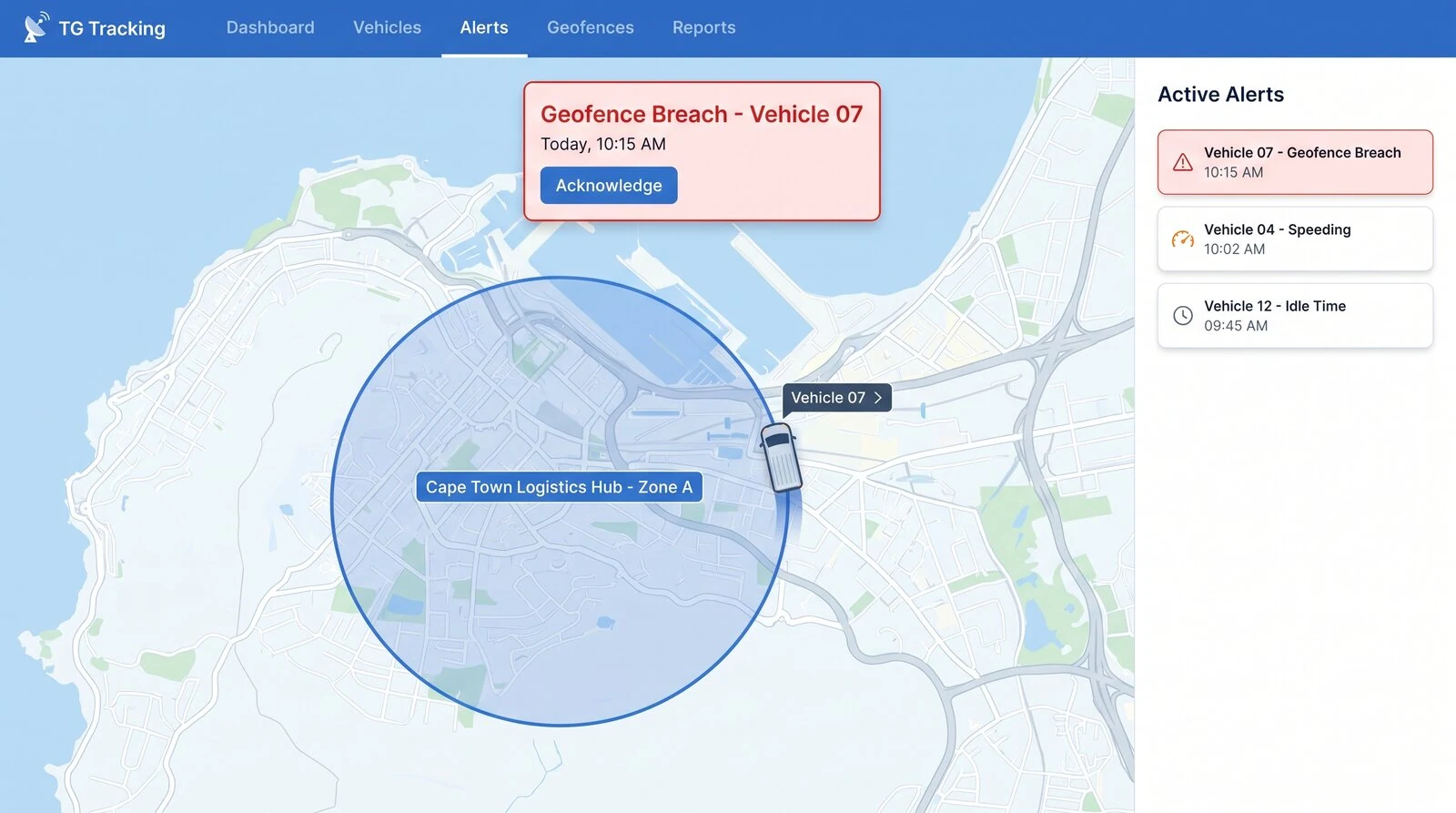
What is Geofencing?
Geofencing involves the use of GPS devices to define a virtual border or boundary in a location. Think of it simply as a digital fence that you control. This enables our software to alert, or trigger a specified response when the tracked asset enters or leaves the geofenced area, or performs a certain activity.
With standard geofencing, an end software platform (such as TG Online) handles alerts by receiving the GPS coordinate data sent by the devices and determining if that was inside or outside a geofence, and what actions to take.
Advanced Geofencing – Downloads to Device
On several of our tracking devices, Geofences can be downloaded directly from TG Online onto the device.
Downloading geofences to the device means that the device itself knows when it is inside or outside a geofence so that it can modify its behavior accordingly:
Setting custom speed limits on private property, such as a mine site, and triggering a buzzer when the driver exceeds the limit.
Disabling cellular communication (and GPS fixes for a period) in a sensitive area, such as at an airport, or on an oil rig.
Using alternate logging parameters depending on the area a device is in, to optimize battery life.
Turning on a vehicle’s emergency lights in a specific area.
Zones that do the watching for you
Mining and heavy equipment
Geofencing and prohibited zone alerts. Multi-site, multi-zone geofencing. Supports most mine mandated IVMS requirements, including fatigue detection, geofencing, seatbelt monitoring and behaviour reporting.
Containers and cargo units
Track the movement of storage containers and cargo units across yards or between sites. Includes geofence alerts, movement tracking and tamper notifications.
Trailers, hire fleets and rentals
Geofence and rental zone alerts, geofence and site zone alerts, movement alerts and recovery support.
Airport dollies and ULDs
Track ground equipment, baggage dollies and cargo units across airports. Real time movement, tamper and geofence alerts.
Boats, caravans and leisure assets
Geofence and marina zone alerts; geofencing and campsite zones.
Vehicles and personal tracking
Entry and exit from custom geofences.
Layered zones and automatic project changes
Multi-layer geofences
When you need to monitor speed off established roads, for example farmland or off-road vehicle routes, you can use geofences to establish and track speeds in vehicles. Where geofences overlap, the smallest by area takes priority, or the one with the higher priority setting.
Read the guideUpdate asset project from destination geofences
When assets make trips and end a trip inside a geofence, the asset's project is changed to that geofence's project. Useful when vehicles move between sites, depots or customers.
Read the guideAlerts you can build on geofences
Geofencing FAQs
What is a geofence?
A virtual boundary you draw around a location, such as a depot, mine site, yard or customer. Think of it as a digital fence that you control.
What triggers a geofence alert?
An alert is triggered when a tracked vehicle or asset enters or leaves the geofenced area, or performs a set activity inside it. You can combine geofences with movement, driver behaviour, sensor and cold chain alerts, scheduled reports and custom notifications.
Do I need a tracking device on each asset?
Geofencing works from the GPS positions that tracking devices send, so each vehicle or asset you want to monitor needs to be tracked. A platform such as TG Online then checks each position against your geofences and handles the alerts.
What is the difference between standard and advanced geofencing?
With standard geofencing, TG Online receives each GPS position and decides whether the asset is inside or outside a geofence and what to do. With advanced geofencing, the geofences are downloaded to the device itself, so it knows where it is and can change its own behaviour, for example sounding a buzzer when a site speed limit is exceeded or switching to battery-saving settings in certain areas.
Which devices support geofences downloaded to the device?
Several of our tracking devices support it. Ask us to confirm for the model you have or plan to use.
What happens when geofences overlap?
The smallest geofence by area takes priority, unless another has a higher priority setting. This lets you set different speed limits for areas within a larger site.
How do businesses use geofencing day to day?
Common uses include prohibited zone alerts on mines, tracking containers across yards, rental zone alerts for trailers and hire fleets, and automatically moving an asset to a new project when it ends a trip at a destination geofence.
Explore Related Pages
Let your zones do the watching
Automate geofences, movement alerts, sensor alerts, scheduled reports and notifications. TG Tracking helps businesses stay ahead of the things that need attention.